Strife Chapters
Working with chapters in Strife
Here you'll find the basics of working with chapters in Strife.
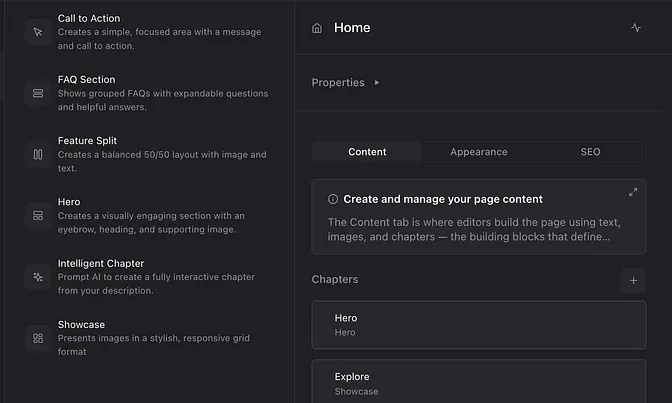
What is Chapters?
Chapters are a pre-defined page component that carries content. and they are independent sections of content that hierarchically does not belong to any specific page. Chapters are the primary building blocks of a web page and are typically used for page structuring and content disposition.
A chapter regulates how content can be presented on a page. A chapter can be built to only present content in one specific way or the chapter can be built to allow for editors to choose from multiple different presentation styles.
Chapters are very flexible in order to be tailored to your specific needs. What kind of chapters that are needed for your site are typically decided in the project requirement phase.
Add a Chapter to a page
When in editing & preview mode, browse this page via the Play button in the top right corner of your screen to play the video.
From the content list, select the page you want to ad a chapter on. Navigate to the chapter section in the right editor panel. Hit the “+” icon to open the chapter library. Choose to insert a chapter on the page or create a new Intelligent chapter to use AI to generate a brand new page component. The chapter will now be added to the page chapter list and you can ad your content to it.
Create an Intelligent Chapter
When in editing & preview mode, browse this page via the Play button in the top right corner of your screen to play the video.
Besides pre built chapters, Strife also uses AI to enable non technical users to create their own chapters, using AI. From the chapter library you can choose to create an Intelligent chapter. Intelligent chapter uses an agent based (agentic) AI setup to generate fully editable page components. Each agent is trained on different aspects of the developing process. This ensures that critical aspects (like validating compliance with design system) are ensures. When AI is done building your Intelligent chapter, toggle to the “edit tab” to do your content edits.
Rearrange chapters
When you ad a new chapter to the page it will by default be placed at the bottom of the page and chapter list. You can easily rearrange the order of your page chapters, simply by drag and drop a chapter to the place you want it. The real time page preview follows your actions so you can instantly see how the chapter is presented on the page.